Android powered robot tank
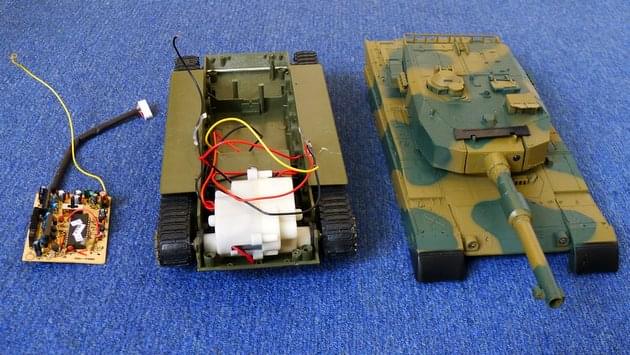
After half a lifetime of dreaming about it, I’ve finally started building a robot. It’s based on a remote controlled tank, an Android mobile phone and a IOIO board which connects the two via USB.
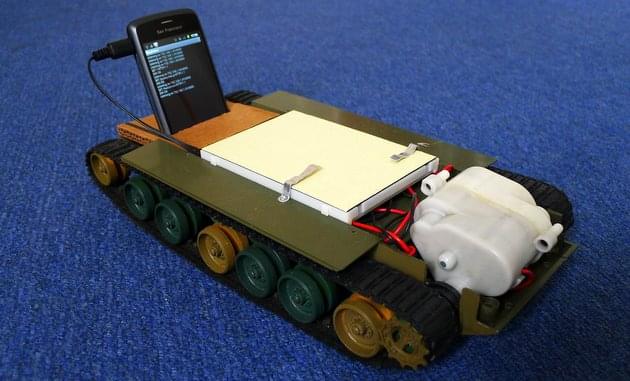
Update: source is available on GitHub including some basic image processing stuff.

The IOIO is a small circuit board with a USB socket, a microcontroller and 48 input/output pins. Plug it into an Android phone and you can use software to write to or read from each of the pins. Roughly speaking, on is 3.3V and off is 0V. Some of the pins can also function as analogue inputs and PWM outputs.
I initially looked at Arduino but in the end IOIO made more sense for a number of reasons:
- Pure Java API – no new languages to learn
- USB built in – Arduino controller would need a USB host shield to communicate with the phone
- Cheaper than Arduino + USB shield
- More IO pins than I could ever need
In theory, the IOIO board works with any Android device. In practice, there are many phones it doesn’t work with. The first phone I bought had to be returned to the shop and the second phone only worked after upgrading it to a non operator branded version of Android. On the other hand it worked straight off when I tested it with someone else’s Nexus One and HTC Desire.
Hardware
The first step was to dismantle the tank and strip out the internal RC circuit. That left only the tracks, drive motors (and gears), battery and on-off switch. Sadly that meant losing the BB gun in the turret. There’s always a next time.

Due to current draw issues, I couldn’t just connect the tank’s motors to the output pins of the IOIO. At best it would not work, at worst it could fry the circuit. I bought a TB6612FNG motor driver circuit which controls two motors using a PWM channel and two digital channels per motor. It connects directly to the battery to provide up to 1A current to each motor. I was initially worried about damage from back-EMF but so far that hasn’t been a problem.
The final pieces of equipment were a set of header pins to solder into the IOIO and TB6612 and a solderless breadboard to make it easy to reconfigure the circuit if necessary.
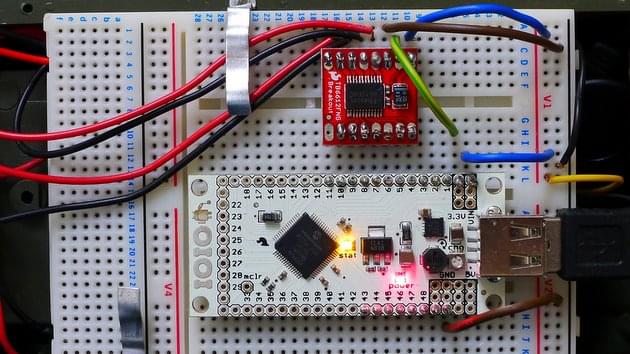
In the photo above:
- The black and yellow wires, centre right, are 10V and ground from the battery (via on-off switch)
- The black and red wires, top and left, go to the motors
- The blue wires are carrying 10V from the battery
- The yellow and green wire is carrying 3.3V from the IOIO to drive the TB6612 chip
- The brown wires are ground
- The TB6612 and IOIO control pins are connected through the breadboard
Software
I’m still not sure what this robot will ultimately do but an obvious first step seemed to be to make it remote controllable over the internet.
This is my first Android project but thankfully the Android SDK and documentation are outstanding. With the help of a few tutorials I went from Hello World to a simple app that accepted HTTP connections in just a few hours.
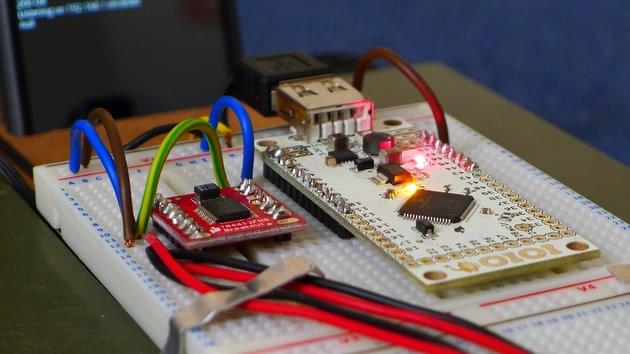
I now have a basic HTTP server on the phone which serves up a single web page and then listens for commands sent from that page over AJAX. Sending real time commands over HTTP is tricky because of the overhead in setting up TCP connections and the fact that requests may arrive out of sequence. I got around the first problem by using HTTP 1.1 persistent connections and the second by including a counter variable with each request. Any request with a counter value less than the last one received is ignored.
Using multiple threads on the phone to handle each incoming request, I’ve got response times over wifi down to around 30ms which is good enough. I’ve not yet tried it over 3G but I suspect network latency may be a big problem.
I looked into using UDP instead of TCP to send the commands as that’s what RTP uses. However there’s no way to send UDP packets from JavaScript and I didn’t want to have to use Flash or Java on the client side.
Next
Likely next steps are:
- Stream video from the camera to the browser so I can drive it from another room (or country)
- Improve the input UI to make it easier to drive
- Implement some basic machine vision algorithms such as line following or the classic photovore behaviour (drives towards light)
- Add a laser line to the front to make a budget laser rangefinder
- Let other people control it over the internet
- Use the Android text-to-speech and the phone screen to give it a voice and a face
- Hook it up to a thermal receipt printer and make it physically deliver my emails
- Implement a behaviour-based robotics API with swappable behaviours
- Foster a community of robot builders using the same API to create a pool of behaviours which can be combined to generate highly complex robot personalities
- Skynet
Posted on 8th August 2011 at 14:59 in Life, Tech | Permalink
Comments
August 8th, 2011 at 23:32
Not sure what it will do ultimately? It will make tea and bring it to me.
August 9th, 2011 at 09:51
Looks great !
Just wait for me to replace the Lego NXT on my own autonomous tanks (http://trandi.wordpress.com/2011/05/14/tiger-1-bb-airsoft-rc-tank-%E2%80%93-v3/) with an Android phone too, and then we can have a tank battle
Dan
August 9th, 2011 at 10:40
Mine’s been demilitarised. I’m afraid it wouldn’t be a fair fight.
August 13th, 2011 at 22:13
I want one!
August 15th, 2011 at 14:40
I built similar robot, basing on Lego Technics and using Windows Mobile phone.
In my case the robot “follows a line” using camera built in the phone.
You can see it in action here: http://www.youtube.com/watch?v=zuphiFkDFmw
August 17th, 2011 at 06:51
Looks difficult but great fun!
August 25th, 2011 at 18:51
I’ve just begun work on my IOIO android bot as well. Do you know of a forum or newsgroup for IOIO bots? I’m looking to make mine into a web-controlled airsoft (and possibly lasertag) drone.
August 26th, 2011 at 17:56
The ioio-users google group is pretty good. Ytai, the designer of the board posts there regularly and is very helpful.
December 21st, 2011 at 13:42
Looks great and am hoping to make something similar myself.
This is going to sound like a stupid question (I’ve not tried doing this before) but what type of header pins did you use…and how do these connect to the breadboard?
Thanks
December 21st, 2011 at 13:51
@Tony I used some of these. Short ends soldered into the IOIO so the long ends stick out on the under side. If you only do the side pins (not the end ones) then it should slot in to any breadboard.
December 21st, 2011 at 13:54
Thanks for the ultra-fast reply!
This is perfect, was just looking on the Maplin website too in the hope I could pick some up this evening, rather than ordering online.
Thanks again.
December 21st, 2011 at 15:07
No problem, good luck with the project and let us know what you come up with. (Christmas time is robot time…)
January 5th, 2012 at 02:12
Hi Tamlyn,
It’s a very cool work, I have some question if you can; how the Motor Driver is connected to IOIO board ? which pins ? and if you can give us an example of a code how to drive a motor CW and CCW, thanks a lot
Claire
January 8th, 2012 at 12:17
Hey can i please get the source code if possible,working on a similar project and got stuck at sockets into android stuff.
January 8th, 2012 at 13:51
People asking for source: see above for update.
January 8th, 2012 at 13:58
Thank you..
February 15th, 2012 at 09:52
The codes given in your side donot have any codes for the IOIO / Arduino Mega. Then how will it run?
How to setup ur Android codes. I am little weak in Java but know eclipse a little
May 9th, 2012 at 01:29
I am going to build a big fast robot to control over net & use in to check my street late @ night.
October 23rd, 2012 at 13:24
TO use the UDP protocol in javascript look for node.js
November 22nd, 2012 at 06:18
#followmejp Android powered robot tank » Tamlyn: http://t.co/hsNtUnNS #sougofollow
November 22nd, 2012 at 06:38
Android powered robot tank » Tamlyn http://t.co/caXItRyJ #opensource
December 5th, 2012 at 03:28
Can you give the complete Circuit details and the details of the tanker (atleast the link to buy tanker).i like to do the project.Thanks
Add a Comment
Mentions elsewhere
[...] via Tamlyn [...]
[...] tu afición en el siguiente proyecto de robótica. Un entusiasta de Android y la robótica , Tamlyn, utiliza un tablero y un chasis recuperado de un tanque a Radio Control para crear este tanque [...]
[...] More info at http://tamlyn.org/2011/08/android-robot/ [...]
[...] robotics enthusiast, Tamlyn, used a IOIO board and a reclaimed RC tank chassis to create this Android powered robot [...]
[...] Nel caso dell’oggetto mostrato in questo article, si tratta di un vero e proprio modello di carro armato giocattolo robot, controllato nientepopodimeno che da uno smartphone Android [...]
[...] você se interessou na invenção e pretende expandir suas funcionalidades, confira o tutorial criado por Tamlyn. Não dá pra ler esta notícia e não lembrar da Skynet, empresa responsável [...]
[...] Tamlyn Via: [...]
[...] Tamlyn Via: [...]
[...] Tamlyn Via: [...]
[...] Tamlyn Via: [...]
[...] Android powered robot tank » Tamlyn [...]
[...] Tamlyn Via: [...]
[...] Tamlyn Via: [...]
[...] Tamlyn Via: [...]
[...] that can be used to control your next hobby robotics project. Android robotics enthusiast, Tamlyn, used a IOIO board and a reclaimed RC tank chassis to create this Android powered robot tank. [via [...]
[...] You can find out more information about how this fun Android powered robot tank was made over at Tamlyn. [...]
[...] : Tamlyn By method of: [...]
[...] Tamlyn Via: [...]
[...] [Link] tweetmeme_style = 'compact'; tweetmeme_url = 'http://www.techfever.net/2011/08/video-mobile-interesting-tanker-controlled-by-android-smartphone/'; Share [...]
[...] inglês Tamlyn explica que passou metade da vida sonhando em construir um robô, até que conseguiu fazer isso, [...]
[...] szabadidőnk, akkor bátran csapjunk le egy Androidos okostelefonnal futó/guruló tankocskára. A Tamlyn tulajdonképpen egy teljesen átlagos távirányítós kisautót (esetünkben kistankot) álmodott [...]
[...] developer Tamlyn made a neat Android-powered toy which some of us would gladly take for a ride. Made out of an [...]
[...] from a web browser Aug122011 Leave a Comment Written by Site AdminLondon-based developer Tamlyn made a neat Android-powered toy which some of us would gladly take for a ride. Made out of an [...]
[...] developer Tamlyn made a neat Android-powered toy which some of us would gladly take for a ride. Made out of an [...]
[...] Via: tamlyn.org [...]
[...] / ago / 2011 Tanc (de joguina) controlat amb un telèfon AndroidCom controlar un tanc (de joguina) amb un telèfon Android… a través d'una placa IOIO connectada per USB i controlada remotament amb el telèfon fent de [...]
[...] ir šioje srityje. Pavyzdžiui, Londone gyvenantis tinklaraščio autorius vardu Tamlinas (Tamlyn) pristatė nuotoliniu būdu kontroliuojamą žaislinį tanką, kurio valdymas vyksta per interneto naršyklę, [...]
[...] via:tamlyn 文字編輯:iapp [...]
[...] via:tamlyn 文字編輯:iapp [...]
[...] via:tamlyn 文字編輯:iapp [...]
[...] http://tamlyn.org/2011/08/android-robot/ [...]